
Telegram Mining Help and TON Wallet Troubleshooting
Fix SignalHash Telegram mining problems with X verification, TON wallets, referral tracking, delayed hash stats, GRAM airdrops, withdrawals and payouts.
Use this guide when the Telegram mining bot, X tasks, TON wallet, referral tracking, hash statistics or GRAM payouts do not work as expected.
Telegram Mining Help and Crypto Mining Troubleshooting
SignalHash combines Telegram permissions, social verification, hash-mining statistics, and GRAM payouts on the TON blockchain. Most support issues can be isolated by checking the affected account, connected wallet, and the exact task or reward state before retrying.
Why Does X Not Connect to SignalHash?
Most X issues come from stale permissions or the browser reusing the wrong X session. Start by clearing the old SignalHash connection from X, then repeat the task from the app.
- Open X in a browser and go to settings for connected apps.
- Remove SignalHash if it appears there.
- Log out from X, or use a private browser window.
- Return to SignalHash and run Connect X again.
- If mobile keeps failing, try the authorization from desktop.
Why Do X Tasks Fail After Connecting?
If SignalHash shows X as connected but tasks still fail, the permission set may be incomplete or stale.
The Telegram crypto mining tasks guide lists the expected X, Telegram and verification steps before a reward can be claimed.
- Remove SignalHash from X connected apps.
- Run Connect X again from Tasks.
- Repeat Follow X or Invite Friends on X after reconnecting.
- Make sure you are using the same X account for all task steps.
How to Reconnect a TON Wallet or Tonkeeper

Wallet issues can come from a stale wallet-app permission. Reconnecting only from SignalHash may not be enough if the wallet app still stores the old connection.
For payouts, the important thing is not the wallet brand. Any TON wallet can work if it is active and the correct address is recorded for your account.
- Open Tonkeeper connected apps.
- Remove SignalHash from the connected app list.
- Return to SignalHash and reconnect the wallet.
- Before claiming GRAM, verify that the TON wallet shown in the app is the wallet you want to receive payouts.
- If you changed wallets, verify that the server-side recorded wallet also matches the new address.
Where Are My GRAM Airdrops and Withdrawals?
The GRAM rewards and airdrops guide explains the reward cycle, withdrawal availability and GRAM payout checks.
Completed contest results show round dates, winners, rewards and public payout data when available.
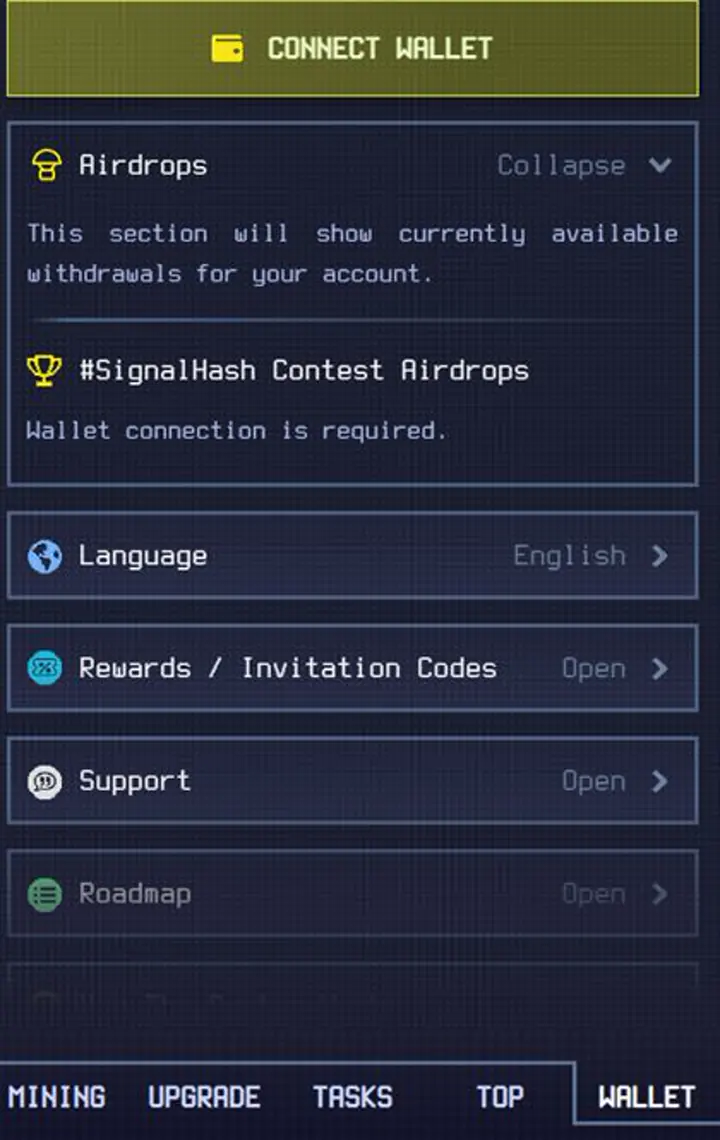
- Open Wallet and then Airdrops to check whether a withdrawal is available.
- Current withdrawals are contest rewards; the main mined balance has a separate withdrawal flow planned for later.
- GRAM contest payouts on the TON blockchain follow the weekly reward cycle, with league recalculation around Monday 00:00 UTC.
- Current weekly prize positions are Gold Top 12, Silver Top 7, and Bronze Top 5.
- The withdrawal button appears in Wallet or Airdrops when the payout is ready.
- Payouts are crypto-only. SignalHash does not send directly to bank cards or fiat payment systems.
- Public payout history should be treated as round-level transparency, not as per-player transaction attribution.
- If your authenticated account shows a withdrawal as sent, check the payout status from that account context.
- If the payout was sent but is not visible, the next step is verifying the wallet saved in your SignalHash account, not retrying the same withdrawal.
Why Did a GRAM Payout Bounce?
GRAM payouts on the TON blockchain can fail or bounce when the saved wallet is inactive, uninitialized, or different from the wallet the player expects. SignalHash support should reason from the wallet recorded in the player account, not from public assumptions.
- Check the transaction history of the wallet address recorded in your SignalHash account.
- If the transaction bounced, make sure the wallet is active before the next payout attempt.
- An active wallet is one that can receive and send normal TON transactions.
- If the wrong wallet is recorded, support needs the new TON address before retrying payout.
Why Is My Referral Count Missing?
A referral only helps if the invited user actually used your invite path and completed the app login. If the count looks wrong, support needs a concrete example to validate.
The current referral rules explain free entry, active-friend bonuses, TON cashback and invite tracking.
- Ask one invited friend for their profile link or username.
- Confirm they opened your invite link.
- Confirm they logged into the app after opening the invite.
- Send support the example profile if the count still does not update.
Promo Codes And Invitation Codes

There is no universal invitation code required to start SignalHash. Promo codes are campaign-specific and are shared through official social channels when a campaign is active.
- Check official SignalHash social channels for active promo campaigns.
- Redeem campaign codes in Wallet and then Promo Code.
- If there is no active campaign, there may be no valid public code to enter.
Why Are My Hash Mining Stats Delayed?
Mining counters and reward estimates can update with a short delay. Some values are shown before the final estimate is recalculated.
Energy is spent as part of mining. If Energy changes after sync, check whether mining activity was also recorded before treating it as a wallet or payout issue.
The Telegram hash mining contest guide explains how hashes, contest score, efficiency and weekly rankings fit together.
- Wait a minute or two before assuming mining is stuck.
- Reopen the app if Energy, shares, or hashes look inconsistent.
- Treat persistent repeated issues differently from a short display delay.
Why Was My PvP Invoice Rejected?
Meteorite, Rain, Explosion, and Promotion prices are verified against the live contest state before Tickets are deducted. A price shown earlier can become outdated when ranks, leagues, time windows, or shared counters change.
An outdated invoice is rejected instead of charging the wrong amount. Refresh the page, reopen the action, and review the current price before confirming again.
Current attack calculations and price tables are maintained in the PvP guide.
Start mining in Telegram
Use this guide while playing SignalHash. Open the Telegram mini-app, start mining, manage Energy, join reward contests, and return here when you need mechanics explained.