
Telegram Mining Tasks and Energy Rewards Guide
Complete Telegram mining tasks in SignalHash: connect X, finish Telegram actions, verify activity, publish referral posts and claim Energy rewards.
SignalHash Telegram mining tasks add Energy, verification, referral growth and contest progress to regular mining sessions.
Players complete tasks through the Telegram mining bot and mini-app, connect X, join community actions, publish referral posts and pass reward checks.
How Telegram Crypto Mining Tasks Work

Tasks are repeatable growth and engagement actions inside the SignalHash Telegram crypto mining game. They connect social accounts, referral activity, verification checks, and Energy rewards to the wider hash-mining loop.
Tasks add Energy and account progression alongside normal mining sessions.
The important distinction is simple: a task is not just a button press. Most tasks have a verification state, a waiting period, or an external check before the reward can be claimed.
Telegram Tasks
Telegram referral and community tasks are used to bring new miners into the game loop. They usually depend on joining official channels, opening the bot, or sharing an invite link from inside the app.
These tasks are designed to support referral growth, not replace mining or contest activity.
Energy, Max Energy And Contest Efficiency
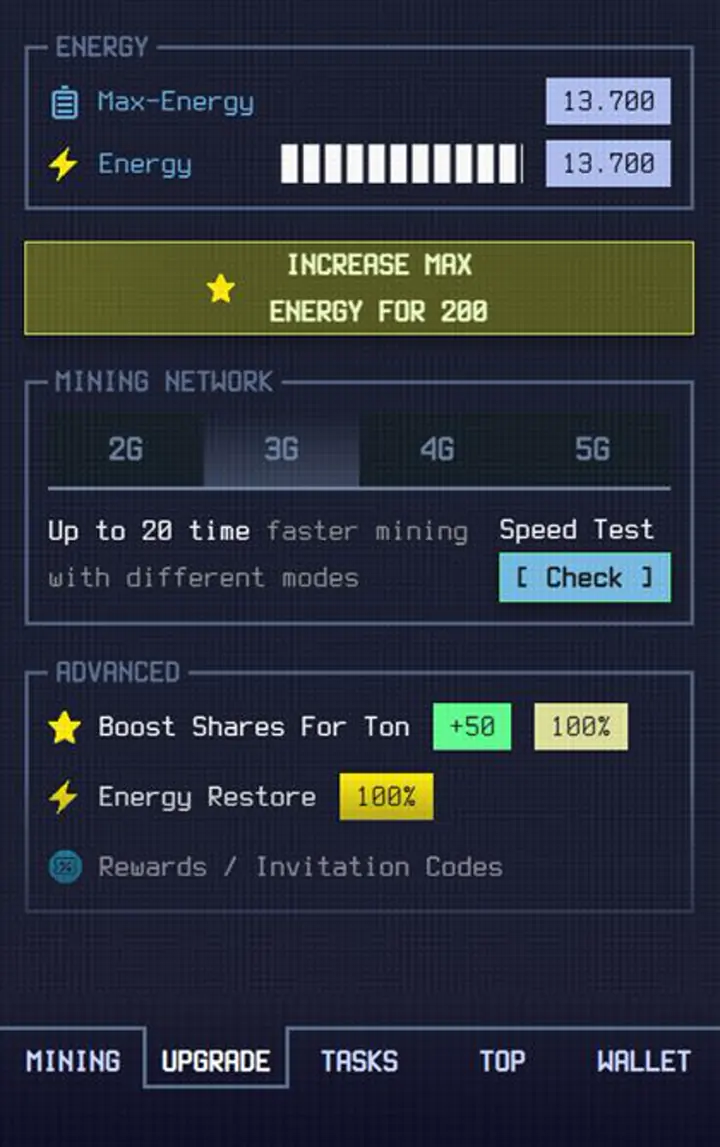
Some tasks and purchases can improve Energy-related progression. Max Energy can be increased through eligible tasks or Energy upgrades, while other actions may restore Energy without raising the maximum.
Energy Restore and Contest Efficiency are separate calculations. Max Energy can contribute up to 75% Contest Efficiency, but the number of counted levels depends on the current league.
The current Contest Efficiency formula explains how Max Energy, Mining Network and social activity affect weekly competition.
- Check task descriptions before assuming every Energy reward increases Max Energy.
- Bronze counts 5 Max Energy levels at 15% efficiency per level.
- Silver counts 7 Max Energy levels at approximately 10.71% per level.
- Gold counts 11 Max Energy levels at approximately 6.82% per level.
- Energy Upgrade purchases can require a short sync before the UI reflects the new value.
- If the server accepted an upgrade but the app still shows the old value, close and reopen the app.
What To Watch
- Do not delete a required social post before the reward is claimed.
- Use the same connected account that completed the task.
- Some checks are not instant; wait before retrying a claim.
- Daily limits exist to protect integrations from abuse.
- Promo code campaigns can also appear as limited-time tasks or puzzles. When they do, the code is usually redeemed from Wallet and then Promo Code.
- Read the referrals guide
- Open contest mechanics
Contest Weather and Energy Reserve

The live Global Contest Weather system makes Energy timing more strategic. A larger Max Energy reserve gives players more freedom to wait through unfavorable global conditions before spending Energy.
Contest Weather modifiers range from +10% to −30% and change every 10 to 15 minutes.
The Contest Weather rules explain why a larger Energy reserve becomes more valuable when global modifiers change.
X Task and Connection Troubleshooting
Use the full crypto mining troubleshooting guide when reconnecting X does not restore task verification.
- If X opens but does not complete, open X in a browser, go to connected apps, and remove SignalHash if it is already listed.
- Log out from X, then repeat the Connect X task from inside SignalHash.
- If SignalHash says X is connected but tasks do not verify, repeat Connect X and Follow X after removing the old connected app permission.
- Private browser mode can help if the browser keeps using a stale X session.
- If mobile authorization keeps failing, try completing X permissions from a desktop browser.
Start mining in Telegram
Use this guide while playing SignalHash. Open the Telegram mini-app, start mining, manage Energy, join reward contests, and return here when you need mechanics explained.



Social Tasks
For Contest Efficiency, Follow X and Join Community add 3.25% each. Together they add a 6.5% social bonus above the standard 100% efficiency maximum.
Invite Friends on X creates referral posts using the player's personal invite link and connects the task system with referral growth.